

Introduction: The Changing Landscape of Affordable Home Automation
The idea of a smart home used to sound expensive and overly complicated. A few years ago, turning an ordinary house into a connected ecosystem often meant buying expensive proprietary hubs, installing complex wiring, paying monthly subscription fees, and spending hours troubleshooting why different brands refused to communicate with each other. If you are tracking how consumer IoT standards and smart home protocols are evolving, you can read more on The Verge Smart Home Desk alongside global technology developments via BBC Technology News and product testing over at Tom’s Guide Smart Home Hub.
The best part? You can start small.
You don’t need to automate your entire house overnight. You can begin with a single inexpensive smart plug, introduce a smart bulb later, add a camera when you require extra security, and gradually build a robust network around the appliances you actually use.
In this guide, we will explore seven budget-friendly smart home devices worth considering in 2026, detail what each one does, explain who should buy it, and provide a framework for building a smart home without breaking the bank.
Quick Comparison: Best Budget Smart Home Devices in 2026
| Device | Best For | Typical Price Category | Main Advantage |
|---|---|---|---|
| Amazon Echo Dot | Voice control | Budget ($49) | Hands-free ecosystem control |
| TP-Link Kasa / Tapo Smart Plug | Automating appliances | Budget ($12 – $15) | Turns ordinary electrical devices smart |
| WiZ Smart Bulb | Connected smart lighting | Very Budget ($10 – $14) | Affordable color tuning and scheduling |
| Wyze Cam v4 | Indoor/outdoor security | Budget ($35 – $40) | High-res local storage monitoring |
| Aqara Door/Window Sensor P2 | Automation triggers | Budget ($20 – $25) | Reliable Matter-over-Thread door states |
| Govee Smart Lighting | Accent lighting | Budget ($25 – $45) | Immense lighting and RGB |
| Matter-Certified Hubs/Devices | Multi-platform homes | Variable | Eliminates brand lock-in and ecosystem friction |
Prices vary by region, retailer, and promotional sales. Treat these tiers as a general purchasing reference rather than fixed quotes.
What Makes a Smart Home Device “Budget-Friendly”?
Before examining individual products, it is vital to define what “budget-friendly” truly means in consumer technology.
A $10 gadget that disconnects from your Wi-Fi every two days, demands an expensive proprietary bridge, forces you into a monthly cloud subscription, or loses software support after twelve months will ultimately cost you more money and frustration than a slightly more refined $20 device from a reputable manufacturer.
For this guide, a budget-friendly smart home device must offer:
- Genuine everyday utility
- Rock-solid network connectivity
- Reliable companion app support
- Major voice ecosystems (Alexa, Google Home, Apple Home)
- Minimal or zero recurring subscription fees
- Straightforward installation
1. Amazon Echo Dot — Best Budget Smart Home Controller
Starting your smart home journey from scratch, a smart speaker is the most logical first purchase. The Amazon Echo Dot remains a cornerstone of budget automation because it packs a crisp, compact speaker and hands-free Alexa voice control into an inexpensive form factor.
Instead of hunting for your smartphone or opening an app every time you want to adjust your environment, you can simply speak a natural command:
- “Alexa, turn off the living room lights.”
- “Alexa, set bedroom temperature to comfortable.”
- “Alexa, good night.”
When tied to custom routines, a single voice command can execute dozens of actions simultaneously—turning off all lights, locking doors, and adjusting your smart plugs. For deeper insights into voice AI and assistant integrations, read My Tech Hub Software Directory or read developer updates on Android Developers Portal.
- Best For: First-time buyers, students, and anyone wanting easy, hands-free voice control.
2. TP-Link Kasa or Tapo Smart Plug — Best Smart Home Upgrade
A smart plug is arguably the most satisfying device for beginners because it bridges the gap between ordinary appliances and modern automation without requiring any electrical wiring expertise.
You don’t replace your lamp, fan, or coffee maker. Instead, you plug the appliance directly into the smart plug, and plug the smart plug into your wall outlet.
Practical Smart Plug Uses
- Lamps and Floor Lighting: Schedule your living room lamps to turn on at sunset and switch off automatically at midnight.
- Coffee Makers: Set your coffee maker to power on every morning at 7:00 AM so fresh coffee is ready when you walk into the kitchen.
- Space Heaters and Fans: Control high-draw climate devices remotely, ensuring you never accidentally leave a heater running when you leave the house.
Many modern budget smart plugs also include built-in energy monitoring, allowing you to track exactly how many kilowatt-hours connected appliances consume over time.
- Best For: Anyone wanting to automate existing lamps, fans, and home appliances instantly.
3. WiZ Smart Bulb — Best Affordable Smart Lighting
Smart lighting transforms how a room feels, and you don’t need to install complicated smart wall switches to enjoy it. Replacing traditional incandescent or LED bulbs with smart bulbs gives you instant control over color temperature, brightness, and color palettes.
The WiZ ecosystem is a standout choice for budget-conscious buyers because it offers reliable Wi-Fi connectivity and robust scheduling features without demanding a costly dedicated bridge hub.
The Power of Automated Lighting
Smart bulbs shine brightest when integrated into automated routines:
- Circadian Lighting: Program your bulbs to emit cool, energizing daylight in the morning, gradually shifting to warm, amber tones as evening approaches to help your body wind down.
- Away-From-Home Simulation: Set your lights to turn on and off at random intervals while you are traveling on vacation to give the impression that someone is home.
- Best For: Renters and homeowners looking for affordable color-changing lights and flexible schedules.
4. Wyze Cam v4 — Best Budget Security Camera
Home monitoring no longer requires signing up for expensive, multi-camera professional security contracts. Affordable indoor and outdoor smart cameras provide peace of mind by letting you check on your property directly from your phone.
The Wyze Cam v4 is a prime example of modern budget engineering, delivering high-resolution video streams, color night vision, motion tracking, and local microSD card slot storage.

Why Local Storage Matters
Many cheap cameras trap you in mandatory monthly cloud subscription models. Choosing a camera that supports local microSD storage or free basic event recording can dramatically lower your long-term cost of ownership, keeping your security footage private and subscription-free.
- Best For: Pet owners, apartment residents, and budget-conscious homeowners wanting reliable property monitoring.
5. Aqara Door and Window Sensor — Best for Smart Automation
Smart sensors are the unsung heroes of home automation. While smart speakers and lights perform actions, sensors tell your home when those actions should happen.
The Aqara Door and Window Sensor P2 utilizes low-power Thread networking and Matter protocol standards, offering lightning-fast response times and rock-solid reliability.
Automation Triggers You Can Set Up
- Front Door: When the front door opens after sunset, automatically turn on the entryway hallway light.
- Bedroom Window: If a window is opened while the air conditioning is running, trigger an automation to pause the AC unit to save electricity.
- Late Night Security: If any exterior door opens between midnight and 6:00 AM, flash indoor lights red and send an urgent push notification to your phone.
- Best For: Users wanting to build responsive, event-driven smart home routines rather than relying strictly on static time schedules.
6. Voice Assistants and Smart Displays: Choosing Your Central Hub
As your collection of smart plugs, bulbs, cameras, and sensors grows, managing them individually through separate smartphone apps quickly becomes cumbersome. To unify your ecosystem into a cohesive experience, you need a central command dashboard—typically anchored by a voice assistant smart speaker or a visual smart display.
Choosing the right ecosystem hub is the most consequential decision in your smart home journey because it dictates which device brands you can buy moving forward.
Comparing the Three Major Ecosystems
- Amazon Alexa / Echo Hubs: Renowned for having the largest library of third-party smart home device compatibility. If you buy random, inexpensive gadget brands off online marketplaces, chances are they support Alexa out of the box.
- Google Home / Nest Hubs: Exceptional for natural language processing, contextual voice commands, and deep integration with Android smartphones, Google Calendar, and YouTube media streaming.
- Apple Home / HomeKit: Prioritizes end-to-end device privacy, secure local data processing, and seamless control through the native Apple Home app across iPhones, iPads, and Apple Watches.
For a comprehensive overview of software automation routines and cross-platform ecosystem comparisons, visit My Tech Hub Software Directory or read developer insights via Google Developers Blog.
7. Matter-Compatible Smart Devices — Best for Future-Proofing
The final recommendation is not a single gadget, but rather a strategic purchasing philosophy: prioritize Matter-compatible devices.
Matter is the universal smart home connectivity standard backed by Apple, Google, Amazon, and Samsung. Its primary goal is interoperability, ensuring that hardware devices can communicate across multiple ecosystems simultaneously.
Why Matter Eliminates Buyer’s Remorse
In the past, buying a smart bulb meant locking yourself into a single proprietary app ecosystem. If you later decided to switch from Android to iPhone, your old accessories might become useless.
Matter-certified plugs, bulbs, and sensors give you the freedom to mix and match hardware brands, knowing they will integrate smoothly with your preferred voice assistant.
- Best For: Anyone wanting to build a flexible, long-lasting smart home without ecosystem lock-in.
Detailed Comparison Table: Budget Smart Home Gear
| Device | Connectivity | Hub Required? | Subscription Free? | Typical Use Case |
|---|---|---|---|---|
| Amazon Echo Dot | Wi-Fi / Bluetooth | No | Yes | Voice control, music, timers |
| TP-Link Tapo Plug | Wi-Fi | No | Yes | Automating lamps, fans, irons |
| WiZ Smart Bulb | Wi-Fi | No | Yes | Color changing, scheduled lighting |
| Wyze Cam v4 | Wi-Fi / MicroSD | No | Optional (Local storage available) | Indoor/outdoor video monitoring |
| Aqara Door Sensor P2 | Thread / Matter | Yes (Border Router) | Yes | Instant door/window open triggers |
| Govee Smart Light Strip | Wi-Fi / Bluetooth | No | Yes | TV bias lighting and room accents |
Step-by-Step Guide: Building Your First Budget Smart Home
To avoid buyer’s remorse and unnecessary spending, follow this logical progression when automating your living space:
- Phase 1: Voice & Control ($50): Purchase an Amazon Echo Dot or Google Nest Mini to establish your central voice assistant hub.
- Phase 2: Appliance Automation ($30): Buy a 2-pack of smart plugs to control your bedside lamps and living room floor fans.
- Phase 3: Atmosphere & Lighting ($40): Install a set of smart bulbs in your most frequently used rooms and configure sunset/sunrise automations.
- Phase 4: Security & Awareness ($40): Add a single indoor security camera and a door sensor to protect your primary entryway.
Total investment? Around $160 for a fully functional, highly responsive automated home setup.
8. Smart Thermostats on a Budget: Optimizing Climate Control and Energy Bills
Heating and cooling represent the single largest energy expense for the average household, often accounting for more than half of a monthly utility bill. While traditional programmable thermostats allow you to set rigid schedules, they lack contextual awareness—meaning your HVAC system continues running at full blast even if you are out of town, asleep, or have left windows wide open.
This is where budget-friendly smart thermostats have revolutionized home energy management.
How Affordable Smart Thermostats Save Money
Modern entry-level smart thermostats bridge the gap between expensive flagship systems and basic mechanical dials. By leveraging geofencing technology through your smartphone’s GPS, an affordable smart thermostat can detect when the last family member leaves the house and automatically dial back the heating or air conditioning.
- Adaptive Scheduling: Instead of forcing you to manually program complex weekly grids, smart learning algorithms analyze your typical waking, sleeping, and departure patterns to construct an optimized climate schedule automatically.
- Remote Access via Smartphone: If you are returning home early from a trip or staying late at the office, you can check and adjust your home temperature from anywhere in the world using a companion app.
- Energy Usage Reports: Detailed monthly graphs show you exactly how many hours your HVAC system operated, helping you identify wasteful heating habits and adjust your settings for maximum savings.
When selecting a budget climate controller, ensure it supports your specific low-voltage HVAC wiring configuration (such as whether you have a C-wire or require a power-extender kit) before purchasing. For deeper analysis on residential energy efficiency standards and smart grid technologies, explore research publications via U.S. Department of Energy Efficiency Office or technical guides on Wirecutter Home Lab.
9. Affordable Smart Door Locks and Keyless Entry Solutions
Fumbling through pockets for physical house keys while carrying heavy grocery bags in the pouring rain is a universal annoyance. Upgrading to a smart door lock eliminates that friction entirely, providing keyless entry, temporary guest access codes, and automated locking routines.
Historically, smart locks required replacing your entire deadbolt mechanism with bulky, expensive motorized hardware that could take an hour to install and often ruined the aesthetic of your front door.
Retrofit Smart Locks vs. Full Replacements
Budget-conscious consumers now have access to retrofit smart locks. These clever devices mount entirely on the interior side of your existing deadbolt, leaving your original exterior key cylinder and keys completely untouched.
- Renter-Friendly Installation: Because you only replace the inside thumb-turn plate, you can install a retrofit lock in under ten minutes using a standard screwdriver—and remove it easily when moving out of an apartment without violating lease terms.
- Auto-Lock and Auto-Unlock: Using Bluetooth and geofencing proximity detection, the lock senses when you approach the front door with your phone and unlatches automatically, then locks itself securely behind you thirty seconds after you step inside.
- Digital Guest Keys: You can generate temporary passcodes for dog walkers, house cleaners, or visiting family members, setting precise expiration dates and times so you never have to hand out physical metal keys again.
For security-minded homeowners, checking encryption standards, ANSI grade certifications, and local building codes is an essential step before committing to any automated access control system.
10. Govee Smart Lighting — Best for Affordable Ambience
If you want to inject personality, warmth, and vibrant color into your workspace, gaming den, or entertainment center without spending a fortune, Govee is the undisputed champion of budget ambient lighting.
Specializing in LED light strips, smart floor lamps, geometric light panels, and TV backlight sync kits, Govee allows you to completely alter the visual mood of a room.
Elevating Your Entertainment Spaces
Mounting a Govee LED strip behind your computer monitor or television creates subtle bias lighting that reduces eye strain during late-night viewing sessions while adding dramatic visual depth to your walls.
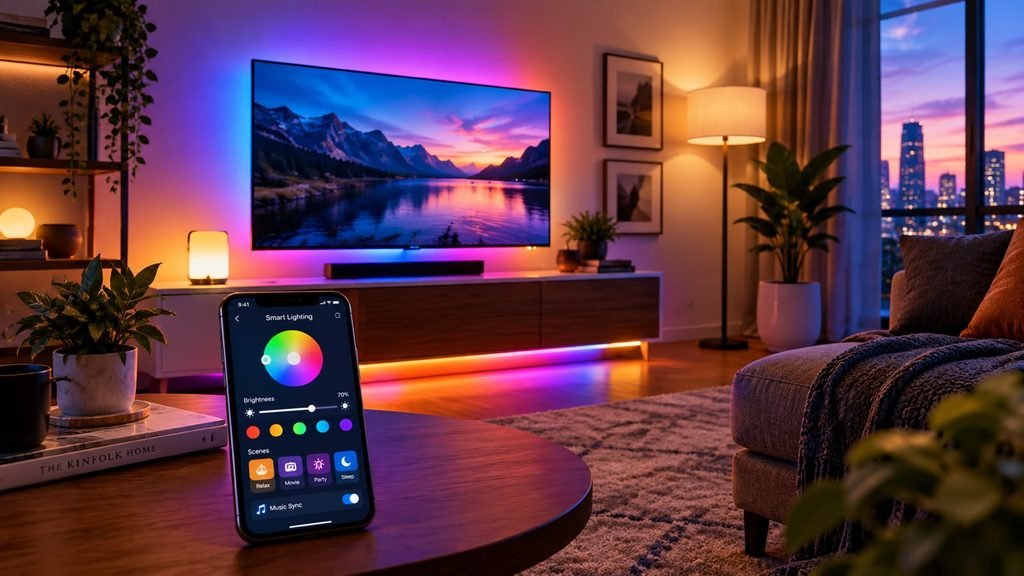
- Best For: Gamers, content creators, and decorators looking to add striking accent lighting on a budget.
11. Smart Leak and Water Sensors: Preventing Catastrophic Home Damage
While smart lights and automated coffee makers are undeniably convenient, certain smart home devices serve an entirely different purpose: financial disaster prevention. Among these, low-cost smart water leak sensors are arguably the highest-ROI investment a homeowner can make.
A slow, undetected pipe leak beneath a kitchen sink or an overflowing washing machine hose can cause thousands of dollars in structural rot, warped flooring, and toxic mold growth before you even notice the problem.
Where to Place Water Leak Sensors
Compact, battery-powered water sensors are designed to sit flat on the floor in high-risk zones around your house:
- Directly beneath the water heater tank.
- Behind and underneath washing machines and dishwashers.
- On the floor beneath bathroom toilets and vanity sinks.
- Inside basement utility closets prone to heavy sump pump overflow.
The moment water bridges the dual gold-plated contact pins on the bottom of the sensor, it instantly fires a high-priority push notification to your smartphone and sounds an audible alarm. Advanced models can even trigger smart water shut-off valves to cut off your home’s main water supply automatically, stopping a catastrophic flood in its tracks while you are miles away at work.
12. Smart Air Quality Monitors and Indoor Environment Sensors
We spend roughly 90% of our lives indoors, yet indoor air quality is frequently overlooked. Stuffy bedrooms, high carbon dioxide (CO_2) levels, volatile organic compounds (VOCs) emitted by cleaning supplies and furniture, and microscopic particulate matter (PM2.5) can lead to chronic fatigue, headaches, poor sleep quality, and reduced cognitive focus.
Budget-friendly indoor environmental monitors track these invisible atmospheric markers in real-time.
Automating Fresh Air Circulation
Pairing an indoor air quality monitor with smart plugs and automated ventilation fans creates a self-regulating breathing ecosystem for your home:
- Carbon Dioxide Triggers: If bedroom CO_2 levels spike above 1,000 ppm overnight while you sleep, an automation can kick on an energy-efficient fresh air ventilation fan or alert you to crack open a window.
- Humidity Management: When bathroom humidity sensors detect a surge in moisture after a hot shower, they can automatically switch on exhaust extractor fans and keep them running until the air clears, preventing mold spores from taking root.
For continuous updates on indoor environmental health standards and consumer product safety testing, consult resources via Environmental Protection Agency (EPA) Indoor Air Quality Division or read equipment evaluations on Wirecutter Appliance Lab.
13. Smart Lighting Automation: Motion Sensors and Ambient Light Triggers
While controlling your smart bulbs via smartphone apps or voice commands is a massive upgrade over traditional wall switches, manually invoking commands still requires physical or mental effort. True ambient intelligence means your home anticipates your needs before you even ask.
The integration of low-cost wireless motion detectors and ambient light sensors elevates lighting automation into the background of your daily life.
Intelligent Lighting Routines in Action
- Midnight Bathroom Trips: Program a motion sensor in your hallway or bathroom to trigger a smart bulb at precisely 5% warm amber brightness between midnight and 5:00 AM. This prevents you from being blinded by glaring 100% white overhead lights in the dark.
- Daylight Harvesting: Ambient light sensors measure natural sunlight entering your windows. If the sun is beaming brightly into your living room, automated smart blinds or dimming routines can adjust indoor lighting levels dynamically, saving electricity throughout the day.
- Vacant Room Power-Down: If a motion sensor detects zero human occupancy in a home office or kid’s playroom for twenty consecutive minutes, it cuts power to connected smart plugs and overhead lights, ensuring energy isn’t wasted on empty rooms.
14. Smart Pet Tech: Automated Feeders, Water Fountains, and Cameras
For modern pet owners, smart home automation extends far beyond human comfort—it provides essential care, monitoring, and peace of mind for furry family members while you are away at work or traveling.
Affordable pet tech bridges the gap between animal husbandry and connected IoT engineering.
Essential Budget Pet Automation Gadgets
- Smart Pet Cameras with Treat Dispensers: Check in on anxious dogs or cats suffering from separation anxiety, speak to them through two-way audio, and launch dry kibble treats across the room with a tap of your smartphone screen.
- App-Controlled Automatic Feeders: Schedule precise portion-controlled meals down to the gram, ensuring your cat or dog is fed on an exact dietary timetable even if your workday runs late unexpectedly.
- Smart Water Fountains: Monitor fresh water circulation levels and receive push notifications when water reservoirs run dry, ensuring your pets always have access to clean, oxygenated drinking water.
Integrating these devices into your broader smart home dashboard keeps your entire household—human and animal alike—running smoothly and safely.
15. The Importance of Robust Wi-Fi Mesh Networks for Smart Homes
One of the most frequent reasons consumers abandon smart home technology in frustration is poor wireless reliability. You buy a dozen smart bulbs, three security cameras, and five smart plugs, only to watch half of them drop offline randomly throughout the week.
The culprit is rarely the smart device itself; rather, it is an overburdened, single-point-of-failure home Wi-Fi router.
Why Standard Routers Struggle With Smart Homes
Traditional ISP-issued routers are typically designed to handle high-bandwidth devices like laptops and streaming 4K televisions. They often buckle under the unique strain of an IoT ecosystem:
- Connection Limits: Cheap routers frequently experience internal ARP table bottlenecks when forced to maintain fifty or sixty simultaneous wireless client connections.
- 2.4GHz Band Congestion: Almost all budget smart plugs, bulbs, and sensors operate exclusively on the crowded 2.4GHz Wi-Fi frequency band, which is heavily prone to interference from neighboring home routers and household microwaves.
Investing in an affordable Wi-Fi mesh networking system (such as Amazon eero, TP-Link Deco, or Google Nest Wifi) creates a blanket of seamless wireless coverage across every corner, basement, and garage of your property, ensuring your smart home gear remains rock-solid and responsive.
16. Local Control vs. Cloud Dependency: Privacy and Reliability
When evaluating smart home gear, a critical technical distinction exists between devices that rely entirely on cloud servers and those that support local offline control.
Cloud-dependent devices route every command from your phone to a corporate server farm in another state or country, which then pings your device back home.
Why Local Control Wins
- Uninterrupted Operation: If your broadband internet service provider suffers an outage or your local fiber line gets cut, cloud-dependent devices immediately stop working. Devices utilizing local protocols like Zigbee, Z-Wave, or local-API Wi-Fi continue operating smoothly within your home network.
- Lightning-Fast Response Times: Local commands execute instantly without waiting for round-trip cloud handshakes, eliminating annoying command lag.
- Superior Data Privacy: Local control keeps your camera feeds, sensor states, and voice commands locked inside your physical house rather than uploading sensitive personal activity logs to third-party corporate servers.
Prioritizing local control standards ensures your smart home remains fast, private, and resilient against external network disruptions.
17. Comprehensive Price & Specification Reference Guide
To help you map out your automation budget against real-world specifications, here is a detailed reference breakdown of top-tier budget smart home devices across multiple categories:
| Device Category | Recommended Model | Connectivity Standard | Hub Required? | Subscription Free? | Typical Price Range (USD) |
|---|---|---|---|---|---|
| Voice Controller | Amazon Echo Dot (5th Gen) | Wi-Fi / Bluetooth | No | Yes | $45 – $50 |
| Smart Plug | TP-Link Tapo P125M | Wi-Fi / Matter | No | Yes | $12 – $15 |
| Smart Lighting | WiZ Connected Color Bulb | Wi-Fi | No | Yes | $10 – $14 |
| Security Camera | Wyze Cam v4 | Wi-Fi / MicroSD | No | Optional (Local microSD) | $35 – $40 |
| Automation Sensor | Aqara Door Sensor P2 | Thread / Matter | Yes (Border Router) | Yes | $20 – $25 |
| Ambient LED Strip | Govee RGBIC LED Strip | Wi-Fi / Bluetooth | No | Yes | $25 – $30 |
| Smart Thermostat | Google Nest Thermostat | Wi-Fi | No | Yes | $129 – $139 |
| Retrofit Door Lock | August Wi-Fi Smart Lock | Wi-Fi / Bluetooth | No | Yes | $149 – $199 |
| Water Leak Sensor | Govee Water Leak Detector | Wi-Fi / RF | No | Yes | $15 – $20 |
| Air Quality Monitor | Qingping Air Monitor Lite | Wi-Fi / Bluetooth | No | Yes | $59 – $69 |
18. Smart Blinds and Automated Window Treatments: Harnessing Natural Solar Energy
For years, automated window treatments were considered an elite luxury reserved for custom-built mansions and high-end corporate boardrooms, with motorized curtain tracks and custom drapery motors easily costing thousands of dollars per window. Today, the rise of retrofit smart blinds and solar-powered shade retrofits has brought automated natural light management down to budget-friendly consumer price points.
The Everyday Benefits of Smart Blinds
Automating your window coverings does much more than provide a futuristic way to open your living room curtains from your phone; it offers tangible impacts on home comfort and energy efficiency:
- Passive Solar Heating & Cooling: Program your south-facing blinds to close automatically during peak summer afternoon hours when solar heat gain is highest, keeping indoor temperatures cool without overworking your air conditioning. Conversely, let the winter morning sun flood in automatically to warm your rooms naturally.
- Privacy Routines: Set automated schedules to close every bedroom and bathroom blind the exact minute local sunset occurs, ensuring privacy without requiring you to walk through the house manually flipping switches or pulling drawstrings.
- Wake-Up Automation: Tie your smart shades to your morning alarm routine so they open slowly at 7:00 AM, allowing gentle natural sunlight to wake you up gradually instead of relying on blaring smartphone alarm tones.
Many budget-friendly retrofit blind motors now feature small, discreet solar charging panels that stick directly to the window glass, trickle-charging the internal battery continuously and eliminating the hassle of manually recharging batteries or plugging wires into wall outlets. For further reading on architectural solar management and smart home energy metrics, explore guidelines via American Society of Heating, Refrigerating and Air-Conditioning Engineers (ASHRAE) or technical appliance reviews on Wirecutter Home Lab.
19. Smart Irrigation and Garden Automation: Conserving Water Outdoors
While interior home automation focuses heavily on convenience, security, and climate control, your outdoor landscaping and lawn care represent another major area ripe for smart optimization. Traditional garden sprinkler timers are notoriously dumb—they run on rigid, preset mechanical schedules regardless of whether it poured rain all night or a severe drought has dried out your soil.
Budget-friendly smart irrigation controllers and moisture sensors prevent wasted water while ensuring your lawn and garden stay healthy.
How Smart Irrigation Adapts to Nature
Smart watering systems connect to your local municipal weather station via Wi-Fi, pulling hyper-local meteorological forecasts in real-time:
- Rain Skips: If rain is forecasted in your specific neighborhood later in the afternoon, the controller automatically pauses the morning sprinkler cycle, preventing you from literally watering your lawn while it is raining.
- Seasonal Adjustments: As autumn approaches and temperatures drop, the system dynamically scales back watering durations to match reduced evaporation rates.
- Moisture Threshold Triggers: Integrating wireless soil moisture sensors ensures sprinklers activate only when soil hydration drops below an optimal threshold, eliminating over-watering and protecting plant root systems from root rot.
Transitioning to an intelligent irrigation schedule can slash outdoor water consumption by up to 30% to 50%, saving you significant money on municipal water utility bills every month. For insights into sustainable landscaping practices and water conservation technologies, consult resources via U.S. Environmental Protection Agency (EPA) WaterSense Program.
20. Designing a Unified Smart Home Dashboard: Wall-Mounted Tablets and Control Panels
As your smart home expands to encompass smart plugs, lights, cameras, thermostats, door locks, and water sensors, relying entirely on individual smartphone apps and scattered voice commands can eventually feel fragmented. When guests visit or family members want to control a light without unlocking a phone, having a centralized physical control point becomes invaluable.
Transforming an affordable wall-mounted tablet into a dedicated smart home control dashboard provides an elegant, command-center experience.

Building Your Own Wall-Mounted Command Center
Using platforms like Home Assistant, ActionTiles, or native ecosystem tablet modes (such as Apple Home on an iPad or Google Home on a Nest tablet), you can mount a low-cost tablet in a central high-traffic hallway or kitchen wall:
- Custom Visual Layouts: Design custom floor plan dashboards showing live security camera feeds, current indoor/outdoor temperatures, lighting status indicators, and one-tap shortcut buttons for “Movie Night” or “Away Mode.”
- Always-On Convenience: Unlike smartphones that move around and lose battery, a wall-mounted panel is always powered, always connected, and instantly accessible to everyone in the household.
By organizing your entire automated ecosystem into a single, intuitive visual interface, your smart home transitions from a collection of isolated gadgets into a cohesive, harmonious living environment. For deeper tutorials on setting up custom local automation dashboards and software integrations, visit the My Tech Hub Software Directory or read open-source automation guides on Home Assistant Official Documentation.
Final Verdict: Smart Living Doesn’t Require a Fortune
Building a smart home in 2026 is no longer an elite luxury reserved for tech billionaires. Thanks to fierce market competition, reliable wireless protocols like Matter and Thread, and affordable manufacturers, anyone can automate their living space for the price of a nice dinner out.
Start with one problem you want to solve—whether that is forgetting to turn off the porch light, wanting hands-free kitchen timers, or needing peace of mind while traveling—and pick the budget-friendly tool designed to fix it. Your home will instantly feel smarter, safer, and infinitely more convenient.