Introduction: Personal AI Employees and the Shift to Autonomous Workflows
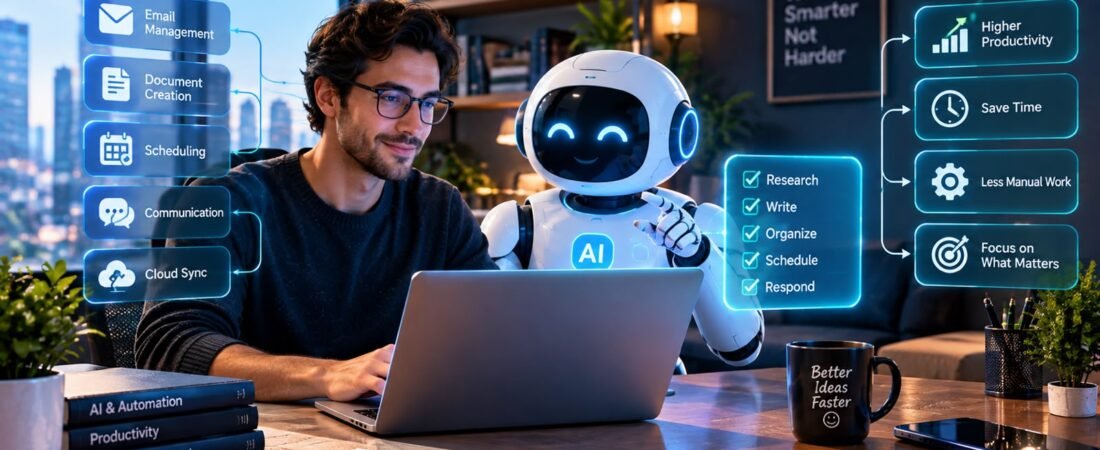
A personal AI employee is transforming the way people work by automating repetitive tasks, managing workflows, and handling everyday responsibilities with minimal human intervention. For decades, digital productivity software has relied on manual processes, leaving people responsible for every task, click, and decision. From drafting emails in Microsoft Outlook and managing spreadsheets in Excel to scheduling meetings in Google Calendar and publishing articles on WordPress, users have traditionally been the driving force behind their workflows. Although these tools offer powerful features, they still depend heavily on human input to get things done. Today, AI-powered assistants are changing this traditional approach by becoming proactive digital partners that can execute tasks, streamline operations, save valuable time, and significantly boost productivity.
Today, that foundational computing model is undergoing a seismic, irreversible shift. We have entered the era of agentic artificial intelligence—systems capable of moving beyond simple text generation to independently execute multi-step workflows, make logical decisions, integrate across disparate APIs, and operate as autonomous digital entities. For solo entrepreneurs, content creators, small business owners, and knowledge workers, building your first personal AI “employee” is no longer a futuristic science fiction fantasy; it is an accessible, highly practical operational strategy.
Imagine deploying a tireless digital assistant that monitors your inbox at 3:00 AM, categorizes incoming client leads, drafts personalized follow-up emails, updates your CRM, generates structured content briefs, and alerts you only when human executive approval is required. In this comprehensive, in-depth guide, we will deconstruct what an AI employee actually is, explore the underlying architecture of autonomous workflow agents, examine key tools and platforms, and provide a step-by-step roadmap to building, deploying, and managing your very own digital workforce. For broader industry context on autonomous agent trends and workflow automation research, you can explore reports via MIT Technology Review AI Desk alongside developer documentation from OpenAI Developer Platform and systems design guides at My Tech Hub Automation Hub.
1. Defining a Personal AI Employee: Beyond Chatbots and Static Prompts
To successfully build your first automated digital worker, you must first unlearn the traditional way of interacting with consumer AI chatbots.
- The Chatbot Limitation: Traditional LLM interfaces (like standard ChatGPT or Claude windows) operate in a reactive loop. You type a prompt, the model replies with text, and the interaction halts until you provide another prompt. They have no memory of external app states, no persistent background execution, and no capacity to take actions outside their chat window.
- The Autonomous Agent Definition: An AI employee or agent is an orchestrator powered by large language models combined with persistent memory, specialized system tools, and execution loops (such as LangChain, AutoGPT, or Make.com scenarios). It can perceive a trigger (e.g., a new form submission), reason through a multi-step execution plan, call external APIs to execute tasks, verify its own results, and complete a complex workflow from start to finish without human hand-holding.
2.Core Architecture of a Personal AI Employee: How AI Agents Reason and Execute
Building an effective AI employee requires understanding the four fundamental layers of autonomous agent architecture:
1. The Reasoning Engine (LLM Brain)
At the core of your agent sits a powerful foundational model (such as GPT-4o or Claude 3.5 Sonnet) that handles natural language comprehension, strategic planning, and conditional logic. It interprets incoming data and decides which steps to execute next.
2. Memory and Context Retention
- Short-Term Working Memory: Retains the immediate context of an ongoing multi-step task (e.g., remembering what data was extracted from an email attachment during step one when drafting a response in step three).
- Long-Term Vector Memory: It connects with vector databases (such as Pinecone or Chroma) for storing past guidelines, documents defining how a brand communicates, customer conversations, etc.
3. Tool Utilization and API Integration
An agent without tools is just a conversational chatbot. Giving your AI employee “hands” means connecting it to external APIs, web scrapers, database connectors, and communication channels (Slack, Gmail, Notion, and Google Sheets) so it can read and write data across your tech stack.
4. The ReAct (Reasoning and Acting) Loop
Rather than blindly executing scripts, advanced agents follow a continuous feedback loop: Thought \rightarrow Action \rightarrow Observation. The agent thinks about what to do, takes an action via a tool, observes the resulting output, evaluates whether it succeeded, and determines the next logical step. For deeper technical breakdowns on agent loops, explore documentation via LangChain Developer Documentation or automation tutorials on My Tech Hub Developer Portal.
3. Identifying Your First Automatable Workflow with a Personal AI Employee
The biggest mistake beginners make when building their first AI employee is trying to automate their entire business overnight. Successful deployment begins with identifying a specific, highly repetitive, rule-based workflow that currently drains your daily time and energy.
Ideal Characteristics of Your First AI Task
- High Repetition: Tasks you perform five to twenty times a day (e.g., sorting incoming support tickets, formatting raw transcript files into blog outlines, or logging expense receipts).
- Clear Input and Output: Workflows where the inputs are structured (emails, form fields, CSV rows) and the desired outputs are well-defined (drafted replies, database entries, summarized reports).
- Low Critical Risk: Avoid starting with high-stakes financial transactions or legal contract generation. Begin with internal operational tasks where errors have minimal negative consequences.
4. Selecting Your Tech Stack: No-Code Builders vs. Custom Python Agents
Depending on your technical background, you can build your AI employee using intuitive visual no-code workflow builders or programmatic agent frameworks.
No-Code Visual Builders (Make.com, Zapier Central, n8n)
- Best For: Entrepreneurs, creators, and business managers without software engineering backgrounds.
- Advantages: Drag-and-drop interface, pre-built integrations with thousands of popular web apps, visual debugging, and rapid deployment in hours rather than weeks. For practical tutorials on setting up visual workflows, read guides via Zapier Automation Blog or workflow design guides on My Tech Hub Software Directory.
Programmatic Frameworks (LangChain, CrewAI, AutoGen)
- Best For: Developers and technical founders wanting granular control over agent memory, custom tools, multi-agent collaboration, and local LLM deployment.
- Advantages: Infinite flexibility, ability to run open-source models locally for maximum data privacy, and complex multi-step reasoning capabilities.
5. Step-by-Step Blueprint: Building Your First Email Triage and Draft Assistant
Let us walk through a practical blueprint for building a semi-autonomous AI employee designed to triage incoming client emails, categorize their sentiment, draft contextual responses, and save them as drafts in your inbox for human review.
Step 1: Establish the Trigger
Set up an automation trigger in your workflow builder that listens for incoming emails matching specific criteria (e.g., arriving in your primary inbox with specific client domain tags or keywords like “inquiry” or “proposal”).
Step 2: Data Extraction and Preprocessing
The workflow captures the incoming email body, sender name, timestamp, and any attached documents, stripping out unnecessary HTML code or promotional footers to conserve token limits.
Step 3: LLM Analysis and Categorization
Pass the cleaned email text to your AI model prompt with strict instructions:
“Analyze the attached email. Categorize the sentiment as Positive, Neutral, or Urgent. Extract the client’s core question. Draft a polite, professional response adhering to our company FAQ guide stored in our knowledge base. Return the output in structured JSON format.”
Step 4: Conditional Routing & Human-in-the-Loop Safeguards
- Urgent Flag: If sentiment is flagged as urgent or angry, route a high-priority push notification to your smartphone via Slack or Telegram.
- Standard Inquiry: Automatically create a draft reply inside your email client using the AI-generated text, allowing you to review, edit, and click ‘Send’ with a single click.

6. Implementing “Human-in-the-Loop” Quality Control
When deploying autonomous digital workers, granting an AI script unrestricted, unmonitored access to execute external actions (like sending public emails, publishing social media posts, or charging credit cards) is a recipe for disaster.
The Power of Approval Gates
- Staged Execution: Configure your AI employee to perform 90% of the heavy lifting—researching, drafting, formatting, and organizing—while halting at a mandatory approval checkpoint.
- One-Click Sign-Off: The agent sends a summary card to your Slack channel or messaging app stating: “I have drafted the weekly newsletter based on your notes. Would you like me to publish it?” You simply click Approve or Reject, ensuring you maintain absolute executive control while saving hours of manual labor.
7. Managing Memory, Context Windows, and Hallucinations
As your AI employee handles longer operational threads, maintaining accurate context without succumbing to AI hallucinations becomes a critical engineering challenge.
- Preventing Hallucinations via RAG: Always ground your agent’s responses using Retrieval-Augmented Generation (RAG). Instead of letting the LLM invent answers from its general pre-trained memory, force the agent to search your company’s internal documents, product guides, or knowledge bases first, synthesizing answers strictly from verified source material.
- Memory Pruning: Long-running agent loops can accumulate irrelevant conversation history that degrades performance and inflates API costs. Implement automated memory summarization protocols that distill past interactions into concise operational logs.
8. Security, Privacy, and Data Governance for Personal AI Employees
Connecting an AI model to your personal emails, customer databases, and internal communications exposes your digital infrastructure to unique cybersecurity vulnerabilities.
- Data Minimization: Never feed sensitive personal identification numbers (SSNs), unencrypted banking passwords, or confidential legal records into third-party cloud LLM APIs unless enterprise privacy guarantees are explicitly enforced.
- API Key Rotation: Store all third-party API keys and webhook credentials in secure environment variables or dedicated password managers rather than hardcoding them into your automation scripts. For enterprise compliance frameworks, consult resources via Electronic Frontier Foundation (EFF) Privacy Guidelines or cybersecurity standards at NIST Computer Security Division.
9. Scaling Your Personal AI Employee into a Multi-Agent Team
Once your first single-purpose AI employee is running smoothly, you can expand your digital operations by building specialized multi-agent teams where different AI models collaborate on complex projects.
The Multi-Agent Division of Labor
- The Research Agent: Crawls the web, scrapes industry competitor blogs, and compiles raw market research reports into a Notion database.
- The Editorial Agent: Takes the raw research notes and formats them into comprehensive blog post drafts following your brand’s style guide.
- The Quality Assurance Agent: Reviews the drafted article for factual consistency, checks tone adherence, and flags grammar errors before final human review.
Comprehensive AI Agent Tool & Platform Reference Guide
To help you compare the top platforms and frameworks available for building your personal AI employee, review the reference matrix below:
| Platform / Tool | Architecture Type | Learning Curve | Estimated Cost (USD) | Best Suited For |
| Make.com | Visual No-Code Builder | Moderate | Free tier / $9 – $29/mo | Automating multi-app workflows & email triage |
| Zapier Central | Natural Language No-Code | Easy | Free tier / $20+/mo | Quick conversational task automation across web apps |
| n8n | Self-Hosted / Cloud Visual | Moderate to High | Free (Self-hosted) / €20+/mo | Privacy-first local workflow automation with AI nodes |
| CrewAI | Python Multi-Agent Framework | Advanced | Free (Open Source API costs) | Building collaborative multi-agent software teams |
| LangChain / LangGraph | Programmatic Python/JS | Expert | Free (Open Source API costs) | Custom stateful agent systems and advanced memory loops |
10. Advanced Prompt Engineering for a Reliable Personal AI Employee
When building an AI employee that operates with minimal human supervision, the clarity, structure, and constraints of your system prompts determine whether your automation succeeds or collapses into chaotic loops. Unlike conversational prompting where minor hallucinations are easily forgiven, autonomous agents require strict behavioral guardrails to prevent erroneous API calls, corrupted database entries, or infinite execution loops.
Engineering Production-Grade Agent Prompts
- Strict Role Assignment and Persona Definition: Define your agent’s exact operational mandate right at the top of the system prompt. Specify its limitations clearly (e.g., “You are an executive operational assistant. You do not have permission to execute financial transactions over $100 without explicit human confirmation”).
- Few-Shot Prompting and JSON Schema Enforcement: Force your agentic models to return responses in strict JSON format or structured markdown templates. Providing explicit few-shot input-output examples inside your prompt teaches the LLM precisely how to format extracted data before passing it downstream to external APIs.
11. Debugging Your Personal AI Employee: Fixing Autonomous Workflow Failures
One of the most frustrating challenges developers and business owners face when deploying AI employees is the phenomenon of silent agent failures. Unlike traditional software code that throws an immediate, hard error and stops execution when something breaks, large language models can sometimes hallucinate a plausible-sounding workaround or loop indefinitely on a corrupted API payload without alerting you.
Establishing Robust Monitoring and Error Handlers
- Execution Logging and Step Auditing: Build comprehensive audit trails into your workflow builders. Every time your agent makes an API call, evaluates sentiment, or queries a vector database, log the input payload, the LLM reasoning steps, and the resulting output to a centralized tracking sheet or logging dashboard.
- Fallback Routing and Exception Triggers: Always configure secondary fallback paths in your automation architecture. If an AI processing node fails, times out, or returns an unparsable response format, the workflow should automatically route a notification to your backup communications channel rather than crashing silently.
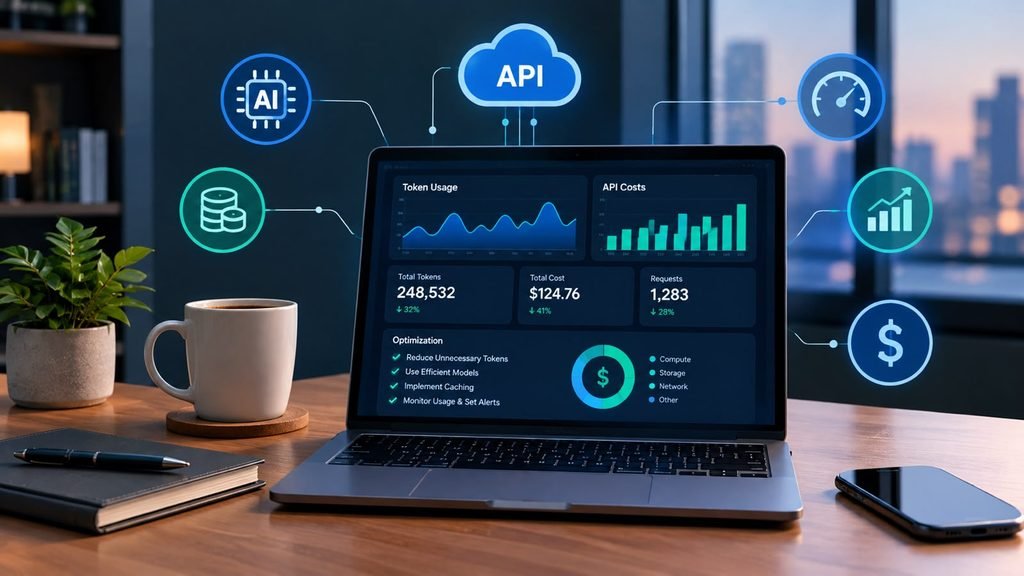
12. Optimizing Token Usage and API Costs for Your Personal AI Employee
Running autonomous background agents that continuously query large language models, parse email threads, and execute multi-step reasoning loops can quickly accumulate surprising API costs if token consumption goes unmonitored. Scaling your digital workforce sustainably requires rigorous cost-efficiency practices.
Strategies for Cost Containment
- Model Tiering Strategy: Do not route every routine task through expensive flagship models (like GPT-4o or Claude 3.5 Sonnet). For simple data extraction, formatting, and text cleaning, utilize faster, lightweight, cost-effective models (such as GPT-4o-mini or Haiku) while reserving flagship models strictly for complex reasoning and strategic writing tasks.
- Caching and Deduplication: Implement caching layers for repetitive queries and deduplicate incoming webhook triggers to ensure your agent never processes the exact same data payload twice.
13.Integrating Vector Databases and Long-Term Memory into Your Personal AI Employee
Standard LLMs suffer from limited context windows and lack long-term memory across separate operational sessions. If your AI employee needs to remember a client’s specific preferences from a conversation three months ago, static prompt engineering will fail. This is where Retrieval-Augmented Generation (RAG) and vector databases become indispensable.
Building Persistent Knowledge Repositories
- Chunking and Embedding Company SOPs: Convert your internal operational documents, brand guidelines, price lists, and past project briefs into vector embeddings stored in managed databases like Pinecone, Milvus, or Chroma.
- Semantic Search Retrieval: When your AI employee receives an inquiry, it performs a semantic similarity search across your vector database, instantly pulling the exact relevant context into its prompt working memory to deliver hyper-accurate, company-aligned responses.
14. Enterprise Compliance, Auditing, and Regulatory Accountability for AI Workers
As autonomous agents begin handling sensitive client data, processing financial documents, and interacting directly with the public, businesses face tightening regulatory scrutiny. Accountability cannot be offloaded onto an artificial intelligence model; the human owner remains legally and ethically responsible for every action executed by their digital employee.
Maintaining Regulatory Standards
- Maintaining Immutable Audit Logs: Ensure all agent actions, decision pathways, and generated outputs are permanently archived with cryptographic timestamps to prove compliance with data privacy regulations like GDPR and CCPA.
- Regular Ethical and Security Audits: Periodically review your agent’s system prompts, tool permissions, and API endpoints to verify that no unauthorized data harvesting or biased decision-making loops have developed over time.
15. The Evolution of Personal AI Employees: Processing Images, Audio, and Code
The next frontier of personal AI employees extends far beyond text-based email sorting and spreadsheet management. Modern multi-modal foundation models possess the ability to perceive, interpret, and generate diverse media formats simultaneously, expanding your digital workforce’s capabilities into creative and technical domains.
Expanding Beyond Text-Only Workflows
- Visual Interface Inspection: Advanced agents can capture screenshots of software dashboards, read complex architectural diagrams, or parse handwritten invoice images, translating visual data directly into structured database entries.
- Sandboxed Code Execution: Modern agents can write Python scripts on the fly, execute them in a secure sandbox environment to analyze raw data sets or generate charts, and present the final visual analytics directly to your workspace dashboard.
16. Self-Healing Code and Automated Error Correction in Agentic Workflows
When deploying autonomous digital workers, encountering errors, broken API endpoints, malformed JSON outputs, or sudden syntax exceptions is an inevitable reality of software integration. In traditional automation workflows, a single unexpected character or a modified third-party API response schema causes the entire script to crash instantly, requiring manual developer intervention to rewrite code.
How Self-Healing Loops Work
- Dynamic Exception Catching: Modern agentic architectures incorporate self-healing feedback loops. When an agent encounters an error or an unexpected API response, instead of halting execution, the error log is captured and fed back into the language model’s reasoning engine alongside the prompt: “The previous API call failed with error code 400. Analyze the payload schema, rewrite the script or parameters, and retry the execution safely.”
- Autonomous Script Patching: Advanced programmatic frameworks can test alternative parameter sets, dynamically adjust data typing, or re-query documentation endpoints to resolve execution roadblocks on the fly, drastically reducing system maintenance overhead.
17. Collaborative Multi-Agent Hierarchies and Specialized Role Delegation
As organizational workflows scale beyond simple task automation, relying on a single monolithic AI agent to manage every operational domain becomes inefficient. Just as human enterprises are structured into specialized departments—such as marketing, finance, customer support, and engineering—advanced AI architectures utilize multi-agent hierarchies.
Structuring Collaborative Agent Teams
- The Orchestrator / Manager Agent: Acts as the executive director, receiving incoming high-level project goals, breaking them down into granular operational sub-tasks, and delegating those tasks to specialized subordinate agents.
- Domain-Specific Sub-Agents: Deploy dedicated worker agents optimized for specific skills—such as a data-scraping agent for web intelligence, a copy-editing agent for content creation, and a quality-assurance agent for compliance verification. They collaborate within shared workspaces, passing structured artifacts back and forth until the project milestone is successfully achieved.
18. Evaluating Your Personal AI Employee: Performance and Automated Benchmarking
Deploying an AI employee into a production workflow is not a “set-and-forget” exercise. Over time, subtle prompt drift, changing external API parameters, or shifting business requirements can degrade an agent’s operational accuracy. Maintaining long-term reliability requires continuous performance evaluation and automated benchmarking.
Rigorous Testing Methodologies
- Synthetic Test Suites: Build comprehensive evaluation datasets containing historical inputs and expected golden outputs. Run your agent scripts against these test suites automatically every time you update a system prompt or adjust a tool integration.
- Scoring Accuracy and Latency: Continuously monitor key performance indicators (KPIs) such as task completion success rate, average execution latency, token consumption cost per workflow run, and frequency of human-in-the-loop overrides.
19. Cross-Platform Orchestration: Unifying Fragmented Business Toolchains
Most independent professionals, creators, and growing businesses rely on a fragmented tech stack—using one platform for email hosting, another for project management, a third for customer relationship management (CRM), and multiple cloud storage buckets for file archiving. A primary value proposition of your personal AI employee is its ability to bridge these isolated silos.
Bridging System Silos
- Unified State Management: By utilizing cloud orchestration hubs or custom webhook connectors, your AI employee acts as a universal translator, reading state updates from your CRM, logging them into your accounting software, and notifying your team via Slack in a synchronized motion.
- Eliminating Manual Data Duploidy: Automating cross-platform data synchronization ensures that customer records, project statuses, and inventory counts remain universally updated across your entire business ecosystem without requiring manual copy-pasting.
20. The Future Horizon: Fully Autonomous Digital Enterprises and Self-Evolving Systems
As we look toward the future of human-AI collaboration, the trajectory of personal AI employees points toward fully autonomous digital enterprises. We are moving from tools that simply execute predefined multi-step workflows to adaptive systems capable of self-optimization and strategic business evolution.
What Lies Ahead
- Self-Evolving Workflows: Future agents will analyze their own operational inefficiencies, rewrite their own system prompts to improve output quality, and autonomously suggest new workflow automations based on recurring bottlenecks observed in your daily communications.
- Democratized Enterprise Power: Solo entrepreneurs and micro-businesses will wield operational leverage and execution speed previously reserved for Fortune 500 corporations, redefining what a single human being can accomplish in a digital economy.
Frequently Asked Questions (FAQ)
Q1: Can AI employee workflows handle unexpected changes in data formats?
A: Yes, unlike brittle traditional scripts that break instantly if a comma or column header changes, LLM-powered agents possess semantic intelligence. They can interpret messy, unstructured data and dynamically adapt their processing logic to handle formatting variations.
Q2: How do I prevent my AI employee from looping infinitely and wasting API tokens?
A: You can prevent infinite loops by establishing strict iteration caps within your workflow logic, setting explicit stop conditions for ReAct agent loops, and implementing timeout error handlers on all external API requests.
Q3: Are self-hosted open-source models better for building personal AI employees?
A: Self-hosted open-source models (run locally via Ollama or n8n) offer absolute data privacy and zero ongoing API token fees, but they require powerful local hardware (such as dedicated GPUs) and technical setup expertise compared to cloud-managed APIs.
Conclusion: Embracing the Future of Autonomous Productivity
Building your personal AI employee represents a fundamental evolution in how we work, create, and scale our daily endeavors. By shifting your role from a manual computer operator to an executive orchestrator of autonomous digital workflows, you liberate yourself from repetitive administrative drudgery and free up mental bandwidth for high-level creative problem-solving.

Start small. Choose one annoying, repetitive daily task, map out its steps, and deploy a simple no-code automation agent to handle it this week. As you gain confidence, expand your digital workforce, refine your agent guardrails, and watch your personal productivity scale to heights previously reserved for large corporate enterprises.