GPT vs Gemini: Which AI Is Better in 2026?
Introduction: The AI Choice Is No Longer as Simple as It Used to Be
A few years ago, picking an artificial intelligence assistant was relatively straightforward. There were only a handful of serious contenders on the market, and most people were simply looking for a tool that could answer straightforward trivia, draft a quick paragraph, or break down a difficult academic concept.
Times have changed drastically.
Today, both ChatGPT and Google Gemini are capable of handling far more than basic conversational prompts. They can effortlessly draft professional emails, summarize dense reports, spark creative ideas, explain intricate subjects, analyze uploaded files, process visual images, conduct deep research, help write and debug computer code, and streamline everyday professional workflows.
Naturally, this leads to an unavoidable question:
ChatGPT vs Gemini — which platform is actually better suited for everyday tasks?
The honest, practical truth is that there is no universal winner for every single user.
The right choice depends entirely on how you structure your daily routine.
A freelance writer who spends hours crafting long-form content will likely prefer one environment, whereas someone whose entire professional and personal life lives inside Gmail, Google Drive, Google Calendar, YouTube, and an Android device will extract significantly more value from the other.
There is also a fundamental difference in underlying design philosophy.
ChatGPT is built from the ground up as a versatile, independent general-purpose assistant capable of seamlessly moving across complex conversations, creative writing, independent research, document analysis, image interpretation, programming, and interconnected digital workflows. OpenAI positions ChatGPT as an everyday tool for brainstorming, structured writing, academic studying, strategic planning, complex mathematics, and multi-file code analysis.
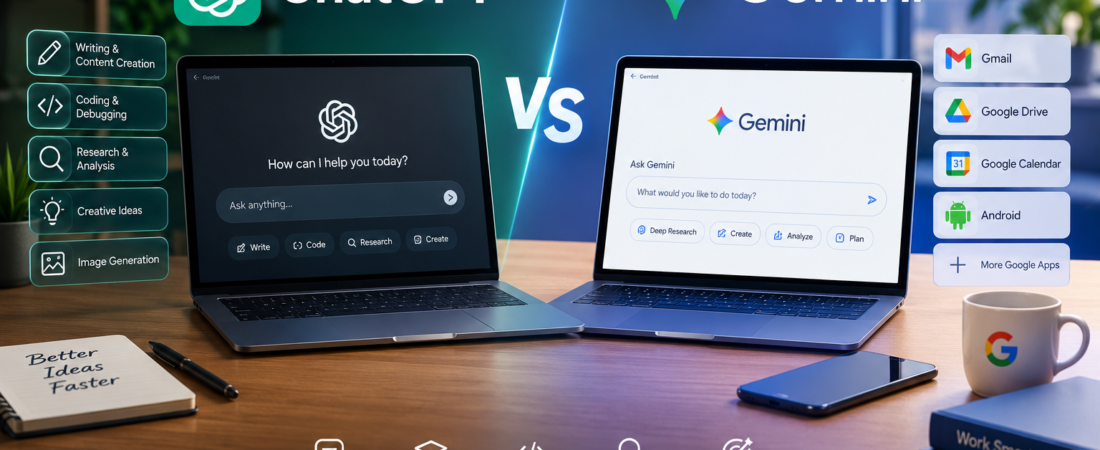
Gemini, on the other hand, derives its greatest strength from being deeply interwoven into Google’s massive, ubiquitous tech ecosystem. Depending on your specific account type and feature rollouts, Gemini works natively alongside core services like Gmail, Google Drive, Google Calendar, Google Maps, and various other workspace applications. Google’s own product documentation highlights advanced features such as Deep Research, interactive workspace canvases, real-time voice interactions, and seamless app extensions.
Therefore, this comparison isn’t simply about asking which tech giant built a “smarter chatbot.”
It comes down to much more practical:
Which assistant actually makes your daily life easier?
Let’s examine how they stack up across the board.
ChatGPT vs Gemini at a Glance
Before diving deep into specific categories, here is a quick overview of how the two platforms compare across everyday use cases.
| Everyday Task | ChatGPT | Gemini |
|---|---|---|
| General questions | Excellent | Excellent |
| Long-form writing | Excellent | Very good |
| Editing and rewriting | Excellent | Very good |
| Brainstorming | Excellent | Excellent |
| Research | Excellent | Excellent |
| Google ecosystem | Good via custom integrations | Excellent |
| Gmail assistance | Good via connected apps | Excellent |
| Google Drive workflow | Good via connected apps | Excellent |
| Android integration | Good | Excellent |
| Coding | Excellent | Excellent |
| Studying | Excellent | Excellent |
| Image understanding | Excellent | Excellent |
| Voice conversations | Excellent | Excellent |
| Creative writing | Excellent | Very good |
| Complex reasoning | Excellent | Excellent |
| Everyday productivity | Excellent | Excellent |
| Best for Google-heavy users | Very good | Excellent |
| Best all-purpose writing assistant | Excellent | Very good |
Keep in mind that these are broad, practical categories rather than permanent standings. Both products evolve at a breakneck pace, and feature availability frequently depends on your geographic region, account tier, hardware device, and software version.
What Makes ChatGPT Different?
Over the years, ChatGPT has evolved from a simple chatbot interface into a comprehensive digital workspace partner.
You can initiate a session with a simple request:
“Rewrite this rough email draft so it sounds more polite and professional.”
Then smoothly transition to:
“Now, analyze the trends inside this spreadsheet.”
Followed by:
“Explain these statistical findings in plain, every language.”
And finally:
“Take that explanation and turn it into a clean presentation outline.”
The ability to fluidly build upon a single, continuous conversation is one of ChatGPT’s greatest operational strengths.
OpenAI positions its models as collaborative tools for everything from personal writing and creative brainstorming to rigorous academic research, strategic planning, and software engineering. Its model ecosystem focuses heavily on advanced reasoning and handling multifaceted logic puzzles.
For an everyday user, however, the technical model names matter less than how naturally the assistant adapts to your personal thought process.
What Makes Gemini Different?
Gemini’s biggest structural advantage stems from its direct connection to Google’s massive product suite.
Billions of people already rely on Google’s core tools every single day:
- Gmail
- Google Drive
- Google Docs
- Google Calendar
- Google Maps
- Google Photos
- YouTube
- Android operating systems
- Google Search
Because of this, Gemini shines brightest when your files, messages, and schedules already live inside these platforms.
Google’s documentation shows that Gemini features can natively access Gmail and Drive, while extension capabilities allow it to pull contextual information from Calendar, Google Keep, Tasks, and Google Chat depending on your account permissions.
This fundamentally alters the user experience.
Instead of constantly copying text out of an email, pasting it into an AI chat window, and moving data back and forth, the assistant can operate directly inside the environment where your data already rests. For professionals heavily invested in the Google Workspace ecosystem, this level of native convenience is hard to match.
ChatGPT vs Gemini for General Questions
Let’s start with the most common denominator: you have a question and you need an answer.
Whether you’re trying to wrap your head around a new technical standard, plan an itinerary for a weekend getaway, understand how a mechanical system works, compare two consumer products, or settle a friendly debate, both tools handle these requests with ease.
ChatGPT tends to feel exceptionally intuitive when a question naturally branches out into a deeper conversation.
You can ask an initial question, review the answer, push back on a specific assumption, request a practical example, ask the AI to dumb it down, and finally reformat the output into structured study notes.
For example: “Explain how cloud computing works.” Then: “Now explain it like I’m fifteen years old.” Then: “Give me a real-world business analogy.” Then: “Turn that into bullet points for an upcoming presentation.”
That natural conversational progression is where ChatGPT feels exceptionally fluid.
Gemini handles similar back-and-forth loops with ease, and its utility spikes when your questions require cross-referencing information trapped inside your own connected Google accounts or pulling real-time insights from Google Search.
- Winner for general conversation: ChatGPT (slight edge)
Realistically, the performance gap for basic queries is minimal. For everyday questions, either assistant will get the job done.
ChatGPT vs Gemini for Writing
Writing is an area where the operational differences between the two platforms become much more apparent.
Writing isn’t just about spitting out grammatically correct sentences; a truly effective writing assistant needs to grasp subtle nuances like:
- Tone
- Target audience
- Structural context
- Rhythmic flow
- Word choice
- Emotional intent
- Level of formality
Suppose you write a draft email that reads a bit too blunt or aggressive. You don’t just want a spell-check—you want to instruct the AI:
“Make this polite and professional without sounding robotic or fake.”
ChatGPT excels at this type of iterative writing collaboration. You can tell it that a paragraph feels too clinical, too casual, overly long, or simply doesn’t sound like your natural voice, and it will adjust instantly.
OpenAI’s GPT models are widely recognized as stellar collaborators for daily correspondence, reports, and creative manuscripts.
Gemini is also a powerful writing aid, especially when your text generation ties directly into Google’s office suite. For instance, Gemini inside Gmail can summarize lengthy email chains, draft context-aware replies, and refine tone on the fly.
- Winner for general-purpose writing: ChatGPT
- Winner for writing directly inside Google’s ecosystem: Gemini
Which Is Better for Long Articles?
If you work as a professional blogger, student, marketer, journalist, or content creator, handling long-form text is a daily requirement.
Writing long articles demands more than just generating 2,000 words on command. You need absolute structural consistency—ensuring the thesis, tone, formatting, and argument flow seamlessly from the introduction to the final conclusion.
ChatGPT is uniquely suited for this style of production because it allows you to construct content modularly:
- Map out the core topic and angle.
- Define the target audience and search intent.
- Establish a detailed article outline with hierarchical headings.
- Draft the introduction hook.
- Expand individual body sections one by one.
- Smooth out awkward transitions.
- Simplify complex technical jargon.
- Compile a helpful FAQ section.
This turns the AI into an active editorial partner rather than a simple text generator.
Gemini can certainly handle long-form pieces as well, particularly when your research notes and source documents are already sitting neatly inside Google Docs or Google Drive.
- For standalone article creation: ChatGPT
- For article work tied directly to Google Docs/Drive: Gemini
ChatGPT vs Gemini for Email
Email management is one category where Gemini holds a clear, structural advantage.
Why? Because Gmail is Google’s home turf.
Gemini allows eligible users to summarize massive email threads, draft replies, polish phrasing, pull historical tracking information from past messages, and coordinate actions across other connected Google services.
Imagine opening an email thread featuring five different stakeholders debating a project timeline. Instead of manually scrolling through dozens of past replies, you can ask Gemini to synthesize the core takeaways in seconds.
ChatGPT is also fantastic for email drafting—you can paste a messy thread and ask it to write a polite pushback or a welcoming client response. However, if your entire digital correspondence lives inside Gmail, Gemini’s native integration saves you from endless copy-pasting.
- Winner for Gmail-heavy power users: Gemini
- Winner for general email drafting and rewriting: ChatGPT
ChatGPT vs Gemini for Research
Both platforms have evolved into sophisticated research engines capable of synthesizing complex data streams.
A basic query like “What is the physical difference between an SSD and an HDD?” doesn’t test the limits of either tool. But a complex prompt like:
“Compare the major shifts in smartphone battery chemistry over the last five years, analyze efficiency trade-offs, and outline what everyday consumers should look out for.”
requires multi-source analysis, contextual evaluation, and structured synthesis.
Gemini’s Deep Research capability shines particularly bright when working with Google-hosted information. Google states that Gemini Deep Research can pull insights across Gmail, Google Drive, Docs, Sheets, Slides, PDFs, and Google Chat alongside live web sources.
Imagine preparing a comprehensive corporate audit where your data spans scattered spreadsheets, internal chat logs, PDF whitepapers, and public web pages. Combining all those inputs into a single research stream saves hours of manual legwork.
ChatGPT also handles deep research workflows exceptionally well, supporting custom connected applications and file references that cite original materials accurately.
- Winner for Google-centered research: Gemini
- Winner for flexible, conversational research workflows: ChatGPT
ChatGPT vs Gemini for Studying
Students arguably stand to gain more from AI technology than almost any other demographic, provided they use the tools correctly.
The goal shouldn’t be to paste homework assignments into an AI window to copy down raw answers. The smarter approach is to use the AI as an interactive private tutor.
Instead of prompting: “Solve this calculus problem for me,” try: “Give me a conceptual hint, but don’t give away the final answer.” Followed by: “Review my working steps and explain where my logic broke down.” And finally: “Generate three similar practice questions for me to test my understanding.”
ChatGPT excels at this back-and-forth Socratic teaching method. It adapts explanations to match different comprehension levels, generates real-world examples, and organizes study syllabi.
Gemini matches this capability with robust educational tools, offering integrated flashcard generation, practice quiz creation, and dynamic learning features.
- Winner: Tie (The right choice comes down to personal learning preference).
ChatGPT vs Gemini for Coding
For software engineers and web developers, modern AI assistants have evolved far beyond simple autocomplete tools. They act as senior architecture partners, debugging aids, test writers, and refactoring engines.
ChatGPT has built a stellar reputation in the developer community for technical problem-solving. OpenAI highlights GPT models as fully capable of tackling complex algorithms, end-to-end software development, and deep bug analysis.
Gemini is equally competent in programming environments and proves especially useful when development tasks intersect with Google Cloud services, repositories, or connected developer documentation.
- Winner for general coding assistance: ChatGPT (slight edge)
- Winner for Google ecosystem development workflows: Gemini
ChatGPT vs Gemini for Image Understanding
Modern AI assistants are completely multimodal, allowing you to upload screenshots, architectural diagrams, handwritten notes, product labels, or data charts and ask direct questions about them.
You might upload:
- A screenshot of a frustrating software error code
- A nutritional label on a food package
- An ugly financial spreadsheet layout
- A whiteboard sketch of a project workflow
- A messy classroom whiteboard note
Both ChatGPT and Gemini handle image analysis and camera-based inputs smoothly as part of their core mobile and desktop experiences.
- Winner: Tie
ChatGPT vs Gemini for Android Users
This is where the user experience diverges significantly depending on your smartphone choice.
Gemini holds an unassailable home-court advantage on Android devices because it is deeply baked into the operating system. Google’s mobile architecture allows Gemini to interact directly with your screen contents, execute voice commands, pull device settings, set reminders, and manage apps naturally.
ChatGPT offers a polished mobile app with great voice capabilities, but it lacks deep, low-level system integration within Android.
- Winner for Android ecosystem integration: Gemini
ChatGPT vs Gemini for iPhone Users
On iOS devices, the playing field looks a bit more balanced.
Gemini is available on iOS, offering text, image, and voice capabilities. ChatGPT also maintains a dedicated, highly responsive iOS app that integrates smoothly into daily workflows.
However, neither tool possesses deep, system-level hookups inside iOS due to Apple’s platform boundaries. If you use an iPhone heavily while still relying on Google Workspace for work, Gemini bridges that gap nicely. If you want a flexible, standalone reasoning partner, ChatGPT remains a powerhouse on Apple devices.
- Winner: Depends on your preferred workflow ecosystem.
ChatGPT vs Gemini for Voice Conversations
There are times when sitting down to type out a long prompt is simply impractical—such as when you’re driving, cooking dinner, prepping for an interview on the go, or pacing around the room to brainstorm.
Gemini features Gemini Live, designed for fluid, interruption-friendly spoken dialogue that mirrors human conversation.
ChatGPT offers advanced voice mode features that provide exceptionally natural cadence and conversational timing.
- Winner: Tie
ChatGPT vs Gemini for Google Docs and Drive
If your professional life revolves around Google Workspace, Gemini takes the crown.
Because Gemini is natively built around Google’s productivity stack, it interacts with files stored in Google Drive, documents in Docs, sheets in Google Sheets, and schedules in Calendar without missing a beat.
Productivity isn’t just about how smart an AI’s underlying math is; it’s about minimizing friction. If your data is already inside Google’s cloud, having an AI that operates natively within that environment eliminates hours of context-switching.
ChatGPT can also link up to external tools like Google Drive through extensions or third-party integrations, but the native experience in Gemini feels much more seamless for heavy Google users.
- Winner for native Google workflows: Gemini
ChatGPT vs Gemini for Creative Work
Creative direction is notoriously difficult to benchmark objectively. A fiction novelist has vastly different needs than a YouTuber, a brand marketer, or an interior designer.
ChatGPT shines during creative brainstorming because of its conversational depth. You can iterate endlessly: “That marketing angle feels too cliché.” “Make it punchier and more emotionally resonant.” “Now, give me five alternative versions targeting Gen Z consumers.” “Blend concepts two and four together.”
Gemini matches this creative flexibility and adds native tools like image generation, dynamic canvases, and multimedia production capabilities depending on your account tier.
- Winner for conversational creative development: ChatGPT
- Winner for Google-connected creative workflows: Gemini
What Is Gemini Canvas?
Google’s Canvas feature provides an interactive, side-by-side workspace dedicated to refining writing projects and code snippets. Instead of getting lost inside a wall of scrolling chat text, you can edit documents directly in a dedicated pane, making targeted adjustments effortless.
This shifts the interaction model away from simple Q&A toward active, collaborative creation.
ChatGPT’s Strength in Longer Workflows
ChatGPT is moving aggressively in a similar direction. OpenAI has expanded connected apps, automated tasks, and agentic workflows that allow users to pull external data into conversations and handle recurring monitoring duties.
Furthermore, advanced agentic tools inside ChatGPT Work are designed to manage multi-step projects across files, generating complete output assets like formatted documents, spreadsheets, slide decks, and code repositories.
For everyday users, this means the definition of an AI assistant is expanding from a simple “Ask and Answer” search box into a proactive productivity partner:\text{Goal} \longrightarrow \text{Plan} \longrightarrow \text{Execution} \longrightarrow \text{Final Result}
Which AI Is Better for Productivity?
Productivity is deeply personal and depends heavily on your daily digital environment:
- Person A: Spends their day inside Gmail, Google Docs, Google Calendar, Google Drive, and an Android phone. \rightarrow Gemini is the clear fit.
- Person B: Spends their day writing articles, conducting research, writing code, analyzing data sets, and solving logic puzzles. \rightarrow ChatGPT is the stronger fit.
Neither user is wrong; they simply occupy different digital ecosystems.
Which One Is Better for Freelancers and Content Writers?
For independent creators, bloggers, and freelance writers, the choice is usually straightforward.
If your daily bread-and-butter tasks involve mapping out article outlines, drafting blog posts, editing rough prose, brainstorming SEO titles, scripting social media captions, writing client proposals, and managing independent research, ChatGPT stands out as an exceptionally flexible all-purpose partner.
However, if your freelance team operates entirely out of shared Google Docs, manages client communications through Gmail, and stores all client briefs in Google Drive, Gemini integrates into that pipeline much more smoothly.
- For independent content creation: ChatGPT
- For Google Workspace-heavy content teams: Gemini
Which One Is Better for Coding?
While both assistants handle programming tasks competently, complex debugging operations require deep context management. ChatGPT maintains a slight edge in handling multi-file architecture questions and generating thorough test coverage, while Gemini excels when development work ties directly into cloud-based infrastructure and web research.
- Overall coding winner: ChatGPT (slight edge)
Which One Is Better at Understanding Long Files?
Whether you’re uploading a 100-page PDF research paper, a dense legal contract, a corporate financial report, or a technical manual:
Both tools handle file parsing remarkably well. However, if your reference documents are already saved inside Google Drive, Gemini can reference multiple files across your cloud storage seamlessly without requiring manual uploads.
ChatGPT vs Gemini: Which One Feels More Natural?
User experience is inherently subjective. If an AI gives technically accurate answers but the conversation feels stiff or frustrating, you won’t want to use it.
ChatGPT feels exceptionally smooth during extended conversational loops. Gemini has closed this gap considerably, especially via Gemini Live and multimodal voice capabilities.
The best way to decide is to run a real-world test. Take five actual tasks from your workday and run them through both platforms:
- Rewrite a sensitive client email.
- Explain a complex industry concept.
- Summarize a long PDF document.
- Brainstorm angles for a new project.
- Solve a recurring workflow bottleneck.
Whichever tool saves you more time and mental energy is the right choice for you.
The Biggest Advantage of ChatGPT
If we had to summarize ChatGPT’s core advantage in a single sentence:
It is an exceptionally versatile general-purpose thinking and productivity partner.
Its ability to fluidly transition between creative writing, coding, technical research, strategic planning, image analysis, and logical problem-solving without changing your interaction style makes it a premier everyday assistant.
The Biggest Advantage of Gemini
Gemini’s strongest selling point is equally clear:
It is unmatched when your digital life is anchored to Google.
If your professional communications, documents, calendar scheduling, navigation, and mobile ecosystem run on Google infrastructure, Gemini fits into your workflow invisibly.
So, Which AI Is Actually Better?
After analyzing all major everyday use cases, the breakdown comes down to this:
Choose ChatGPT if you want:
- A versatile, highly adaptable writing and editing assistant
- Superior support for long-form content creation
- Deep brainstorming and conversational problem-solving capabilities
- Flexible general-purpose file and image analysis
- Powerful standalone reasoning support
Choose Gemini if you want:
- Deep, native integration with the Google Workspace ecosystem
- Seamless Gmail drafting, summarizing, and inbox management
- Direct Google Drive document workflows
- Powerful Android-oriented mobile AI features
- Google Calendar, Maps, and cloud app extensions
And remember: nothing stops you from using both. Many digital professionals keep both tools in their toolkit, deploying ChatGPT for deep thinking and creative drafting, and turning to Gemini whenever tasks require interacting directly with Google ecosystem data.
Final Verdict: ChatGPT vs Gemini
When looking at everyday tasks, ChatGPT takes the overall edge for users seeking a single, highly flexible general-purpose assistant that handles writing, research, coding, and brainstorming with minimal friction. Its sheer versatility makes it a powerhouse for independent creators and problem-solvers.
At the same time, Gemini is an absolute must-have for anyone deeply entrenched in Gmail, Google Drive, Google Calendar, and Android. By positioning the AI directly inside the apps where your data already lives, Google eliminates tedious copy-pasting and streamlines daily office productivity.
The ultimate goal of artificial intelligence isn’t brand loyalty—it’s getting better work done with less effort. Pick the tool that plugs most naturally into your daily routine, or use both to get the best of both worlds.