
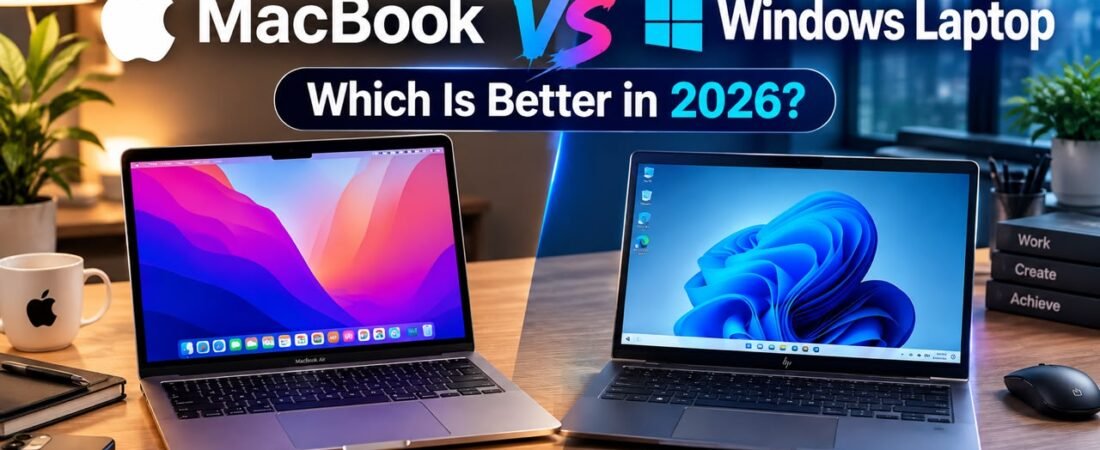
Introduction: The Modern Dilemma of Choosing a Laptop
Choosing a new laptop in 2026 sounds deceptively simple until you actually start shopping. You can walk into an electronics store or browse an online marketplace and find dozens of devices that appear to offer nearly identical specifications on paper. Some run macOS, while others use Windows. Some prioritize feather-light portability and all-day battery endurance, while others focus purely on high-octane gaming or professional workstation power. If you are exploring how cutting-edge mobile silicon and thermal architectures are evolving, you can check out hardware deep dives on NotebookCheck alongside industry evaluations on Ars Technica.
Then comes the ultimate question:
Should you buy a MacBook or a Windows laptop in 2026?
The answer is far more nuanced than it was a few years ago. Apple’s MacBook lineup has become phenomenally powerful thanks to custom Apple silicon, with modern M-series chips delivering desktop-class performance while sipping battery power. Windows laptops, meanwhile, have exploded into a diverse universe of devices. Buyers can choose from ultra-portable Copilot+ PCs, blazing-fast gaming rigs, heavy-duty creator workstations, flexible 2-in-1 convertibles, sleek business ultrabooks, and budget-friendly student notebooks.
Windows boasts an undeniable advantage in hardware variety, giving you access to countless form factors across nearly every price point.
MacBook takes a completely different, highly controlled route. Apple designs the hardware, the operating system, the silicon architecture, the display panel, the trackpad, and the audio system. This tight vertical integration creates a seamless, cohesive user experience, but it also means fewer hardware configurations and less overall customization than the open Windows marketplace.
So, which platform is genuinely better in 2026? Let’s break down how MacBook and Windows laptops compare across performance, battery life, artificial intelligence, gaming, software compatibility, displays, pricing, security, and long-term value, using optimization strategies inspired by Tom’s Hardware.
MacBook vs Windows Laptop: Quick Comparison
| Category | MacBook | Windows Laptop | Winner |
|---|---|---|---|
| Performance | Excellent Apple silicon | Huge range from basic to workstation | Tie |
| Battery Life | Industry-leading efficiency | Excellent on premium models | MacBook |
| Gaming | limited catalog | GPU choices | Windows |
| Software Compatibility | Excellent creative ecosystem | Broadest overall software support | Windows |
| Creative Work | Top-tier for video/audio | Top-tier for 3D/rendering | Tie |
| Business and Enterprise | Popular in creative | IT infrastructure | Windows |
| AI Features | Strong Apple Intelligence ecosystem | Strong Copilot+ PC ecosystem | Tie |
| Hardware Variety | Limited (Apple only) | Massive (Dell, HP, Lenovo, ASUS, etc.) | Windows |
| Build Quality | Consistently premium | Highly variable by manufacturer | MacBook |
| Touchscreen | Generally unavailable | Widely available across styles | Windows |
| 2-in-1 Form Factors | Limited / None | Extensive convertible options | Windows |
| Trackpad | Unmatched glass haptic trackpads | Varies by manufacturer | MacBook |
| Upgradeability | None (Unified architecture) | Possible on select models | Windows |
1. The Core Philosophy: Integration vs. Choice
The most fundamental difference between a MacBook and a Windows laptop isn’t the processor speed or the screen resolution. It is the underlying operating system philosophy.
MacBooks run Apple’s proprietary macOS, while competing laptops run Microsoft’s Windows.
Apple builds its machines to work in absolute harmony with its own software and ecosystem. Everything from the sleep-wake cycle to finger gestures on the trackpad is meticulously tuned.
Windows, on the other hand, is built to be a universal chameleon. It runs on hardware manufactured by dozens of different companies, powering everything from a $300 plastic school laptop to a $4,000 liquid-cooled gaming beast.
- Apple emphasizes seamless consistency, premium build standards, and battery efficiency.
- Windows emphasizes infinite choice, hardware flexibility, and deep software compatibility.
2. MacBook in 2026: Why Apple Silicon Changed Everything
Apple’s transition away from traditional Intel processors to its custom M-series architecture completely revitalized its laptop lineup.
Modern MacBooks are defined by their performance-per-watt efficiency. By placing the CPU, GPU, and unified memory onto a single interconnected chip, Apple reduced data travel times and energy loss.
MacBook Air can run demanding photo-editing applications or compile code for hours while sitting quietly on your lap without burning your legs or draining the battery. For students and traveling professionals who hate carrying heavy power bricks, this efficiency is revolutionary.
- Best For: Users who value silent operation, exceptional battery life, premium build quality, and a distraction-free creative workflow.
3. Windows Laptops in 2026: The Power of Infinite Choice
While Apple refines a small, curated collection of laptops, the Windows ecosystem offers a staggering array of options. If you want a specific screen size, a dedicated NVIDIA graphics card, a 360-degree folding touchscreen, or a rugged chassis built to military drop-test standards, Windows has a model designed for you.
Manufacturers like Dell, HP, Lenovo, ASUS, and Microsoft continually push hardware boundaries. In 2026, Windows laptops lead the industry in introducing cutting-edge display technologies like tandem OLED panels, modular upgradeable components, and advanced NPU-powered AI capabilities.
Furthermore, if your work or daily routine relies on specific enterprise tools, legacy applications, or high-end PC gaming hardware, Windows provides uncompromised native support. For more tips on organizing your digital workspace or evaluating enterprise technology, check out resources on ZDNet or hardware databases on PCMag.
- Best For: Gamers, power users, creative professionals needing dedicated NVIDIA GPUs, and anyone who wants a touchscreen or specific hardware budget.
4. Gaming: Windows Wins by a Landslide
If gaming is a primary factor in your purchasing decision, the verdict is instantaneous: Buy a Windows laptop.
While Apple has made admirable strides with its “Game Porting Toolkit” and modern M-series graphics capabilities, the vast majority of AAA game developers build their titles primarily for Windows and DirectX.
- The Windows Advantage: Access to Steam, Epic Games Store, Xbox Game Pass, massive game libraries, competitive multiplayer anti-cheat compatibility, and powerful dedicated graphics cards from NVIDIA and AMD.
- The Mac Limitation: Many major titles skip macOS entirely, and compatibility layers cannot bridge the gap for every game.
If you want to fire up the latest blockbuster games at high frame rates, a Windows gaming laptop is your only practical choice.
5. Creative Work and Professional Workflows
Both platforms are powerhouses for creative professionals, but they excel in slightly different areas.
Video Editing and Music Production
MacBooks remain legendary among videographers, podcasters, and music producers. Specialized media engines built directly into Apple silicon make editing 4K and 8K video streams in apps like Final Cut Pro or DaVinci Resolve buttery smooth.
3D Rendering and Local AI Development
When your creative workflow shifts toward heavy 3D rendering in Blender, Unreal Engine, or local machine learning model training, high-end Windows laptops equipped with dedicated NVIDIA RTX GPUs hold a distinct advantage. NVIDIA’s CUDA architecture and VRAM capacity make Windows workstations the preferred choice for heavy GPU-accelerated computing.
6. Battery Life and Portability
Battery endurance is an area where MacBooks historically held an untouchable crown. Thanks to the power efficiency of M-series chips, even a slim, fanless MacBook Air can easily outlast most traditional laptops during web browsing and office productivity tasks.
However, the gap has narrowed among premium Windows ultrabooks. Modern Windows laptops powered by highly efficient ARM processors and advanced Intel/AMD architectures can now deliver impressive all-day battery life.
That said, the Windows market is a mixed bag. If you buy a budget Windows laptop, battery life can be mediocre. If you buy a high-performance Windows gaming laptop running a discrete GPU, expect to stay tethered to a wall outlet during heavy tasks. With a MacBook, consistency is guaranteed across the board.
7. The Ecosystem Factor: iPhone vs. Android
Your smartphone should play a heavy role in deciding your next laptop.
- If you use an iPhone: A MacBook unlocks seamless ecosystem integration. Features like Universal Clipboard, iPhone Mirroring, iMessage, AirDrop, and seamless FaceTime handoff make the transition between phone and computer completely frictionless.
- If you use an Android phone: Windows pairs wonderfully with Android through Microsoft Phone Link, allowing you to view text messages, manage notifications, and access phone photos directly on your PC screen. Samsung Galaxy phone users enjoy even deeper integration.
8. Price, Value, and Longevity
When it comes to initial pricing, Windows wins on variety. You can find functional Windows laptops starting at very modest price tags, making them accessible to tight student budgets.
MacBooks start at a higher baseline price because Apple does not manufacture “cheap” plastic laptops. Every MacBook is constructed from unibody aluminum with high-resolution Retina displays.
However, long-term value tells a different story. MacBooks hold their resale value remarkably well over the years and receive prompt, long-lasting operating system updates directly from Apple. Premium Windows business laptops match this longevity, but low-end Windows machines tend to degrade in performance much faster.
9. Summary: Which One Should You Buy?
To make your final decision crystal clear, consider these guidelines:
Choose a MacBook if:
- You already use an iPhone and love Apple’s ecosystem.
- All-day battery life and fanless, quiet operation are your top priorities.
- You do core creative work (video editing, music production, writing, photo editing).
- You want a premium, highly responsive trackpad and durable aluminum chassis.
- You don’t care about playing heavy PC games.
Choose a Windows Laptop if:
- PC gaming is a major hobby or priority for you.
- You need specific Windows-only software for engineering, architecture, or enterprise work.
- You want a touchscreen, a 2-in-1 convertible hinge, or tablet flexibility.
- You need a dedicated NVIDIA graphics card for 3D modeling or AI development.
- You are shopping on a strict, budget-conscious price limit.

10. Thermal Management and Fan Noise Under Load
How a laptop handles heat dictates how long it can sustain peak performance. Traditional Windows laptops and high-performance gaming rigs rely heavily on internal fans and complex copper vapor chambers to vent heat. Under heavy workloads like rendering video or playing competitive games, these fans can roar to life like a jet engine.
MacBooks take a different path. Because Apple silicon is so efficient, models like the MacBook Air operate entirely fanless—meaning zero moving parts and absolute silence, even when pushed hard. Higher-end MacBook Pros do feature active cooling fans, but they rarely spin up unless you are executing intense, multi-hour computing tasks. If working in complete silence matters to your creative concentration, Apple’s thermal design holds a distinct edge.
11. Security and Privacy Architecture
In an era where digital security is paramount, both platforms approach safety differently. macOS benefits from its Unix-based foundation, sandboxed application architecture, and strict Gatekeeper controls that block unverified software downloads by default. Malware targeting Macs is historically less common, though users must still remain vigilant against phishing and malicious web extensions.
Windows laptops feature robust enterprise-grade security protocols, including TPM (Trusted Platform Module) chips, Windows Hello biometric facial recognition, BitLocker device encryption, and SmartScreen protection. However, because Windows is the world’s most widely used desktop operating system, it naturally remains a larger target for cyber threats. Keeping your security patches current is vital on both operating systems, but corporate environments often favor Windows for its deep integration with centralized IT management tools.
12. External Display Support and Multi-Monitor Workflows
If your daily productivity routine involves connecting your laptop to external monitors, external display handling is a specification you must inspect closely. Historically, base-model Apple Silicon MacBooks were artificially restricted to driving only a single external display unless you stepped up to a Pro or Max processor tier—though newer generations have begun relaxing these constraints.
Windows laptops, by contrast, have virtually zero restrictions regarding multi-monitor setups out of the box. Whether you are driving a single ultra-wide curved monitor or a dual-screen desktop workstation, Windows handles layout management, scaling, and resolution switching seamlessly. If your workspace relies on multiple external screens for complex data analysis or video monitoring, Windows provides a much more flexible plug-and-play experience.
13. Accessibility and Assistive Technology Features
Both Apple and Microsoft have made monumental strides in making their operating systems accessible to users with visual, auditory, mobility, or cognitive disabilities. Apple’s macOS includes world-class built-in tools like VoiceOver, Switch Control, Voice Control, and customized display accommodations that sync effortlessly across the entire Apple device ecosystem.
Microsoft matches this dedication through the Windows Accessibility ecosystem, offering features like Live Captions across any audio source, Eye Control navigation for users with physical impairments, Voice Access for complete hands-free computer control, and custom adaptive accessories. Both companies treat accessibility as an essential human right rather than an afterthought, meaning users with specific physical requirements will find robust, high-quality support on either platform.
14. Port Repairability, Maintenance, and Right to Repair
When a laptop breaks out of warranty, the cost and feasibility of repair become critical factors. Modern MacBooks are engineering marvels of miniaturization, featuring glued-in batteries, tightly integrated unified memory chips, and heavily serialized components. If something goes wrong on a logic board, component-level repairs can be exceptionally costly, pushing many users toward AppleCare+ protection plans.
The Windows laptop market is highly fragmented regarding repairability. Traditional thin-and-light ultrabooks mirror MacBooks with soldered RAM and proprietary parts. However, a growing movement toward modular computing—pioneered by brands like Framework—allows users to swap out broken screens, upgrade storage, replace keyboards, and even change port modules using a simple screwdriver. If longevity through DIY maintenance is your goal, certain Windows ecosystems offer unmatched freedom.
15. The Hidden Costs of Peripherals and Accessories
When budgeting for a new computer, buyers frequently look only at the sticker price of the laptop itself, ignoring the ecosystem tax of necessary accessories. MacBooks feature limited port selections on lighter models, meaning you will likely need to invest in quality USB-C hubs, multi-port adapters, or specialized Thunderbolt docks to connect legacy mice, HDMI cables, and SD cards.
Windows laptops often mitigate this expense by keeping legacy ports alive directly on the chassis—providing built-in full-size HDMI ports, USB-A slots, and SD card readers right out of the box. Conversely, Apple users often find themselves investing in complementary ecosystem gear like AirPods, iPads, and iPhones to maximize macOS continuity features. Always factor dock and adapter costs into your total computer budget.
16. Artificial Intelligence Integration: Apple Intelligence vs. Copilot+
Artificial intelligence has fundamentally reshaped how we interact with personal computers, moving from novelty chatbots to deep operating system integration. Apple approaches AI through Apple Intelligence, focusing heavily on local processing privacy, writing assistance, automated notification summaries, clean image generation, and a context-aware Siri integration that understands what is happening on your screen.
Microsoft approaches AI through Copilot+ PCs, leveraging specialized NPUs (Neural Processing Units) built into modern Windows hardware. Windows Copilot provides deep system-level control, real-time audio translation, advanced local file searching through semantic memory recall, and powerful generative image creation tools. Both ecosystems are powerful, but your preference may depend on whether you trust Apple’s privacy-first on-device philosophy or Microsoft’s expansive cloud-connected workflow tools.
17. Audio Quality, Microphones, and Media Consumption
For users who consume media, attend back-to-back Zoom meetings, or listen to music while working, the hardware components dedicated to audio play an enormous role in everyday satisfaction. MacBooks feature industry-leading spatial audio speaker systems and studio-quality microphone arrays that put many standalone desktop microphones to shame, making media playback rich and immersive without needing external speakers.
The Windows laptop market offers a wide spectrum of audio quality. Premium Windows notebooks from brands like Dell (with Waves MaxxAudio) and Microsoft Surface deliver phenomenal sound profiles. However, budget-friendly Windows laptops frequently suffer from tinny, underpowered bottom-firing speakers and muffled web-conferencing microphones. If pristine out-of-the-box sound is vital to your routine, MacBooks provide reliable excellence across the entire lineup.
18. Customization, Modding, and Operating System Tweaks
If you enjoy tinkering with your operating system, changing visual themes, writing custom batch scripts, modifying system registry keys, or installing deep utility modifications, Windows remains the undisputed king of computer customization. You can bend the Windows interface to look, feel, and behave precisely how you want down to the finest detail.
macOS is intentionally designed with a “walled garden” philosophy regarding deep system modification. While you can adjust desktop wallpapers, accent colors, and notification behaviors, Apple maintains tight control over core interface elements to prevent users from breaking system stability. For power users who love deep personalization, Windows offers an open playground; for users who want things to just work reliably without tinkering, macOS provides peaceful friction-free stability.
19. Resale Value, Depreciation, and Secondary Markets
Computers are expensive investments, and considering how much money you will recover when it comes time to upgrade a few years down the road is a smart financial strategy. Historically, MacBooks hold their resale value on secondary markets significantly better than almost any Windows competitor. Because Apple updates its product line slowly and maintains long software lifecycles, a three-year-old MacBook Pro still commands an impressive price tag.
Windows laptops depreciate much faster, driven by rapid hardware iteration cycles, massive holiday discounting, and a crowded marketplace. While a high-end ThinkPad or XPS will retain decent value, an average mid-range Windows laptop loses a substantial percentage of its worth within the first twelve months. If you prefer trading in your tech every few years to fund your next upgrade, Apple’s residual value provides a noticeable financial cushion.
20. Environmental Sustainability and Eco-Friendly Manufacturing
As consumers and corporations place an increasing emphasis on environmental responsibility, sustainability has become a critical benchmark for evaluating modern consumer electronics. Apple has made massive strides in its hardware manufacturing processes, embedding recycled aluminum, recycled gold, recycled cobalt, and post-consumer plastics into the core chassis of its MacBook lineup. Furthermore, Apple’s corporate operations and entire manufacturing supply chain maintain a carbon-neutral footprint, appealing directly to eco-conscious buyers who monitor their carbon lifecycle.
The Windows laptop market exhibits a stark contrast due to its vast, decentralized ecosystem. While elite manufacturers like Dell, HP, and Lenovo have introduced impressive eco-friendly laptops utilizing ocean-bound plastics, magnesium-aluminum alloys, and bio-based carbon fiber composites, budget-tier Windows devices frequently rely on virgin plastics and non-sustainable packaging. For buyers prioritizing corporate social responsibility and verified green manufacturing credentials, Apple provides a unified, transparent sustainability standard across every single MacBook it ships.
21. Estimated Price Comparison Table (2026 Market Estimates)
To help you plan your budget when shopping for a new laptop, here is a reference table outlining estimated retail price ranges for popular MacBook and Windows laptop categories in 2026:
| Laptop Category | Typical Specifications / Tier | Estimated Price Range (USD) |
|---|---|---|
| Budget Student Windows Laptop | Core i3 / Ryzen 3, 8GB RAM, 256GB SSD | $350 – $600 |
| Mainstream Windows Ultrabook | Core i5 / Ryzen 5, 16GB RAM, 512GB SSD | $700 – $1,100 |
| MacBook Air (M3 / M4) | Apple Silicon, 16GB Unified RAM, 256GB/512GB SSD | $999 – $1,499 |
| Mid-Range Windows Gaming Laptop | Dedicated RTX Graphics, 16GB RAM, 512GB SSD | $900 – $1,500 |
| MacBook Pro (Pro / Max Chips) | High-End Apple Silicon, 18GB+ RAM, 512GB+ SSD | $1,599 – $3,499+ |
| High-End Windows Creator / Workstation | OLED Display, RTX Studio GPU, 32GB+ RAM | $1,800 – $3,500+ |
$1,000 MacBook vs $1,000 Gaming Laptop: Which Should You Buy
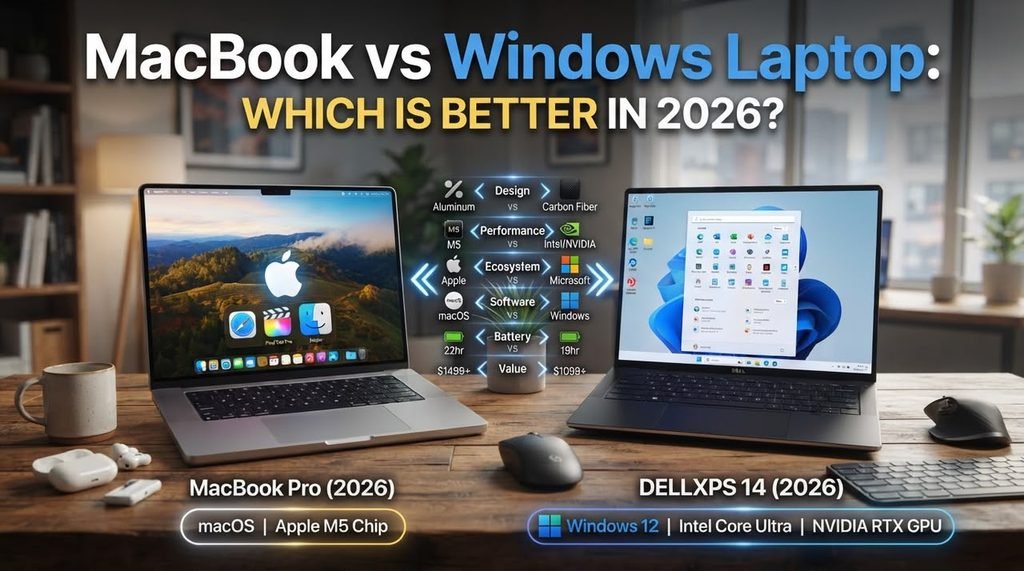
Final Verdict: MacBook vs Windows Laptop — Which Is Better in 2026?
The MacBook vs Windows debate in 2026 isn’t about finding a universal “best” computer—it’s about matching the machine to your unique workflow.
If you prioritize refined elegance, battery endurance, and creative fluidity, Apple’s MacBook lineup is phenomenal. If you require hardware variety, touchscreens, software flexibility, and gaming power, Windows remains unmatched. Evaluate your software requirements, your smartphone ecosystem, and your budget, and you’ll easily find the laptop that fits your life.